

Table of Contents
- Part 1: What Are Drum Samples? (The Double Standard)
- Part 2: What is Steven Slate Audio Trigger 2?
- The Three Core Workflows Explained
- Part 3: Foundations & Controls (The Big Four)
- The Onboard Transient Gate & Filters
- Part 4: Leakage suppression & Advanced Detection
- Advanced Workflow: Audio-to-MIDI Conversion
- Part 5: Tone Shaping, Blending & Phase Alignment
- Level Up Your Tone: Third-Party Libraries
Part 1: What Are Drum Samples?
You open a new multitrack session to mix. You solo the snare track, and it sounds worse than Lars Ulrich’s infamous St. Anger trash-can snare. You solo the kick, and a wet cardboard box would sound punchier than the thud the artist sent over.
Sound familiar? We’ve all been there.
Before we dive into Slate Trigger 2, let's address the elephant in the room: drum samples.
1. What Are Drum Samples (and Why the Double Standard?)
Although drum sampling and replacement have been used in professional studios since 1979—when legendary engineer Roger Nichols invented the "Wendel" digital drum replacer for Steely Dan’s Gaucho album—samples still carry an odd stigma among certain musicians, purists, and age groups.
It’s actually hilarious when you think about the double standard in our industry:
The Industry Double Standard: We have sampled every single instrument in existence. Producers have been dropping synthesized string sections and digital piano patches into hit records since the 1980s—and back then, those early string samples sounded terrible! Nobody batted an eye. But the moment you trigger a snare sample, traditionalists bring out the pitchforks.
The truth is, like any artistic tool, there are good implementations and bad ones:
- Stealth Realism (Rock & Pop): When used correctly, 99% of listeners (and band members!) will never be able to tell the difference between a natural drum recording and an expertly reinforced drum sample.
- Intentional "Machine-Gun" Effects (Dubstep, DnB, Electronic): In genres like Dubstep or Drum & Bass, ultra-consistent, hyper-quantized machine-gun triggering isn't a flaw—it's a sought-after aesthetic! What rock purists hate, EDM producers celebrate.
Key Benefits of Using Drum Samples
- Dynamic Consistency: Keep your kick drum anchoring the low end evenly throughout the track—even if the drummer’s dynamics drift or their energy flags during longer takes.
- Spill & Bleed Elimination: Isolate pristine drum crack and punch without bringing up a deafening wall of hi-hat spill or harsh cymbal roar.
- Fixing Poor Recordings: Rescue acoustic tracks recorded in bad-sounding rooms with budget microphones.
- Time Saving: Even if the tracking session was stellar, some artists don't have the budget for endless mixing hours. Triggering reliable samples gets you to a competitive drum sound fast—saving both your time and your client’s wallet.
Check out this short video to see the power of Drum Samples and Slate Trigger 2:
Part 2: What is Steven Slate Audio Trigger 2?
Over the remaining blog, we’re going to demystify the audio industry's gold-standard drum triggering tool so you can transform your muddy multitracks into punchy, stream-ready mixes.
At its core, Trigger 2 is a real-time drum replacement and reinforcement plugin. It analyzes incoming audio transients (like a live snare or kick hit), detects the exact millisecond the drum is struck, and fires off a pre-recorded, high-fidelity sample in real-time with sample-accurate precision (most of the time).

The Three Core Workflows Explained
When working with Trigger 2, you aren't locked into a single workflow. Depending on your mix goals, you have three primary approaches:
- Total Replacement: You mute the original live acoustic track completely, allowing the pristine sample to take over 100% of the drum tone.
- Reinforcement (Blending): You keep the original live drum track active to capture the drummer's organic feel, ghost notes, and micro-dynamics, while blending a punchy sample underneath to add weight, crack, or low-end consistency.
-
MIDI Triggering (In & Out): Rather than relying solely on real-time audio detection, Trigger 2 offers robust two-way MIDI integration:
- Triggering via Incoming MIDI: You can feed MIDI notes directly into Trigger 2 from your DAW timeline or an electronic drum kit (e.g., Roland V-Drums). Trigger 2 acts as a hyper-realistic VST sound module, responding dynamically to incoming velocity numbers with its multi-layer .tci samples. It's worth noting that Slate Trigger 2 only works with drum shells and not cymbals.
- Audio-to-MIDI Conversion (Outgoing MIDI): Trigger 2 can analyze a live audio track and send real-time MIDI data out to drive other virtual instruments.
The Takeaway: Trigger 2 isn't about "cheating" or hiding behind bad recordings—it's about taking total creative control over your mix so your drums sound competitive on every sound system.
Part 3: Foundations & Controls
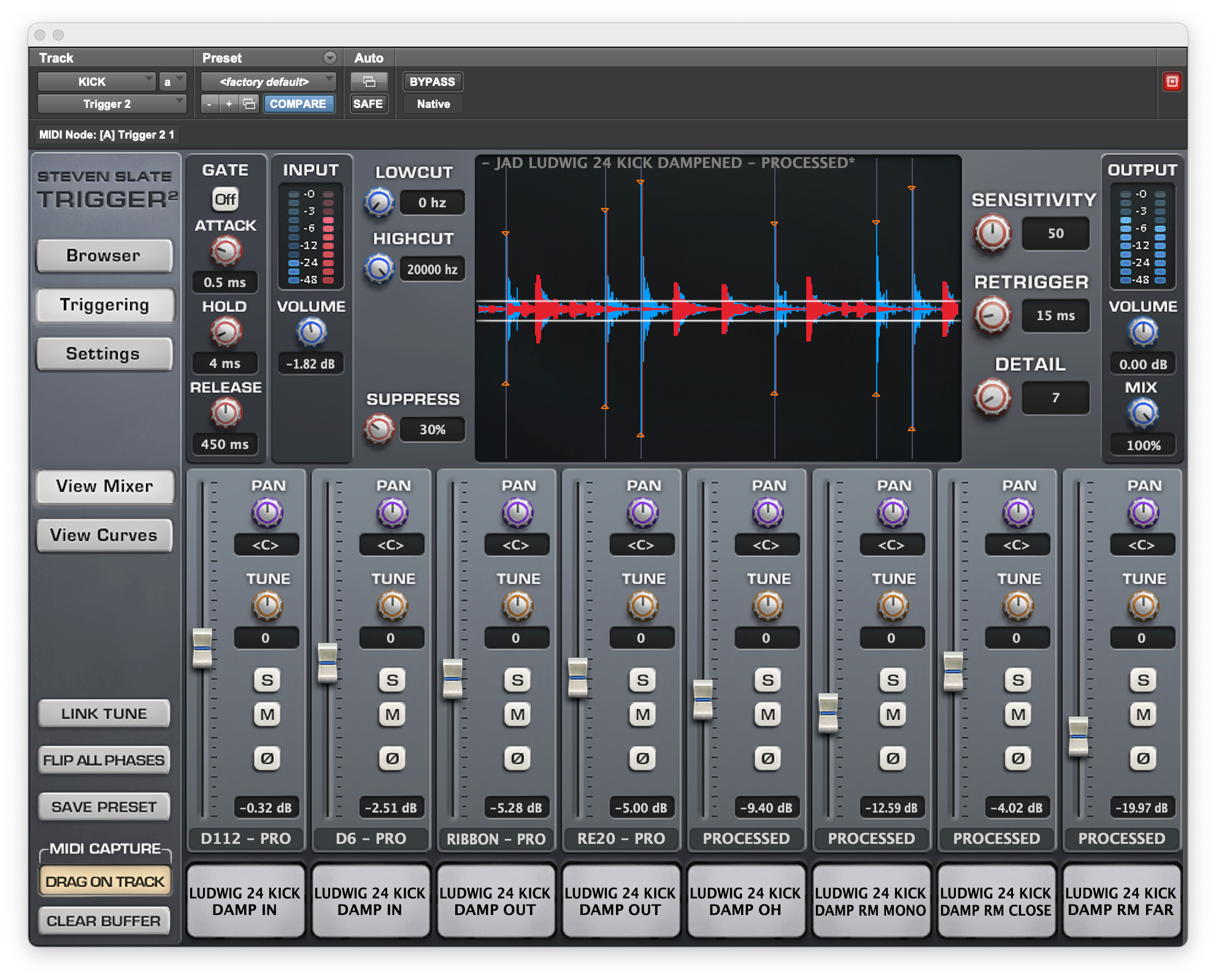
Now that you know what Trigger 2 is, it's time to dive under the hood. When you first open the plugin window, the real-time visualizer waveform display takes center stage. Understanding how Trigger 2 "sees" transient energy is the key to setting up flawless triggers.
The Big Four Detection Controls
Before adjusting drum samples, you must dial in the primary detection parameters located in the main triggering window:
1. Input Volume
Scales the incoming audio signal inside the plugin window without altering your DAW's channel fader level.
Rule of Thumb: Boost this gain until the transient spikes fill roughly 70–80% of the visualizer window for clearer threshold targeting.
2. Detail
Sets the absolute detection threshold line across the visualizer display.
- Lowering Detail: Pushes the threshold line lower to catch delicate, quiet ghost notes.
- Raising Detail: Pulls the threshold line up to isolate only loud, main hits.
3. Sensitivity
Sets the engine's sensitivity level.
- Default Setting (50): Works immediately for standard Kicks, Snares, and Toms.
- High Setting (90–95): Enables you to trigger quiet low-volume micro-details, such as subtle snare ghost notes.
- How It Works with Detail & ReTrigger: Sensitivity operates in conjunction with both Detail and ReTrigger. Fine-tuning Sensitivity alongside Detail enables you to set the optimal value so Trigger 2 ignores background bleed. If you push it too far, bleed will naturally spill through, so adjust in small increments.
4. ReTrigger
Defines the minimum time delay (in milliseconds) required before another sample can fire.
- Why It Matters: Prevents accidental double-triggering on long snare tails, ringing toms, or sloppy flams. Set it between 15–60ms for fast drum rolls, or higher (80–120ms+) for steady tempos.

The Onboard Transient Gate & Filters
What if your raw drum track is completely saturated with hi-hat sizzle or bass rumble? Trigger 2 features an integrated Transient Gate & Filter Section to clean up the detector signal before it hits the triggering engine:
- Bandwidth Filtering (HPF / LPF): Narrow the detection frequency range. For example, engaged High-Pass and Low-Pass filters can isolate 200Hz – 3kHz, forcing Trigger 2 to focus exclusively on the core "crack" of a snare drum while ignoring high-frequency cymbal sizzle or sub-bass kick bleed.
- Gate Envelope: Adjust the gate threshold and attack to clamp down aggressively between drum hits. This ensures that only the razor-sharp transient passes through to the trigger engine, ignoring trailing cymbal decays.
Part 4: Leakage & Advanced Detection
In a perfect world, every drum track would be totally clean. In reality, a snare track often contains almost as much hi-hat and crash cymbal bleed as actual snare sound.
If simple gating and threshold settings aren't stopping loud cymbals or kick drum spikes from triggering false samples, Trigger 2 has a specialized feature called Leakage Suppression.
How Leakage Suppression Works
Rather than forcing a single channel to guess what is a drum hit and what is cymbal spill, Leakage Suppression uses a sidechain input to teach Trigger 2 what audio to ignore.
3 Steps to Route Leakage Suppression in Your DAW
- Create a Stereo Bus: Route your main drum audio channel (e.g., Snare) to the Left side of a stereo Aux track.
- Send the Bleed Source to the Right Channel: Route a send from the track causing false triggers (e.g., Kick Drum or Hi-Hat) to the Right side of that same stereo Aux track.
- Dial in the Suppress Knob: Turn up the Suppress knob in Trigger 2.

Visual Feedback: Suppressed hits will turn red in the visualizer window, confirming that Trigger 2 is actively ducking its transient detection engine during those bleed spikes while continuing to trigger normally on clean hits.

Advanced Workflow: Audio-to-MIDI Conversion
Sometimes you don't want to use Trigger's onboard sample engine at all—you want to convert the drummer's performance into clean MIDI data to feed an external software instrument, synth layer, or sampler.
Trigger 2 makes Audio-to-MIDI extraction seamless using its onboard MIDI Capture tool:
- Navigate to the MIDI panel in Trigger 2 and select your desired MIDI note assignment (e.g., C1 for Kick, D1 for Snare).
- Click Clear Buffer to reset the capture memory.
- Press Play in your DAW. Trigger 2 converts incoming transients into MIDI velocity data in real-time.
- Once captured, click and hold the Drag on Track button, then drag the generated MIDI file straight onto an instrument track in your DAW timeline!
Part 5: Tone Shaping, Blending & Phase Alignment
Now that the detection engine is firing cleanly without false triggers, it's time to build your dream drum sound. Trigger 2 is a full-fledged sample mixer.
The Mix View (Up to 8 Stereo Layers)
Opening the Mix View reveals eight channel strips. You can stack up to 8 stereo .tci files simultaneously to build a single massive sound.
Each slot includes individual Pan, Tune (pitch shifting), Solo/Mute, and Polarity (Phase Flip) controls.

The Curves View: Envelope & Velocity Control
Switch over to the Curves View to shape how your loaded samples react dynamically to the live performance:
- Attack / Sustain / Release: Shorten the sustain to create a tight, modern gated snare, or increase the attack time to let the original live transient pass before the sample kicks in.
- Dynamics Knob: Controls how strongly Trigger enforces output velocity scaling.
- Range Sliders (1–127): Restrict the velocity window. For instance, if you only want a sample layer to fire on full-velocity rimshots, cap its lower range threshold at velocity 100.

Preventing Phase Cancellation
Crucial Rule: When blending multi-mic samples with live acoustic tracks, phase misalignment will instantly hollow out your low end. Always toggle the Polarity (Phase Flip) button on individual sample slots while listening to the full drum bus to verify which setting yields the fullest, punchiest low-frequency response.
Level Up Your Tone: Third-Party Libraries from Just Add Drums
While Trigger 2 includes an excellent stock library, mix engineers often hit a wall when looking for fresh, character-rich acoustic tones or pre-configured mix-ready options. That’s where third-party libraries come in.
If you want to take your Slate Trigger 2 workflow even further, Just Add Drums has built premium, ready-to-load .tci expansion libraries designed specifically for modern producers and mix engineers.
The Collections for Slate Trigger 2
Rather than forcing you to sort through thousands of over-processed or flat raw samples, The Collections by Just Add Drums deliver the perfect balance: dual versions of every drum (tight, pre-mixed processed hits alongside pristine raw multi-mic recordings) that you can blend directly inside Trigger 2.
1. The Wood Snare Collection
Too many drum libraries lock you into a sound that doesn’t fit your track. Processed kits are inflexible, and raw kits take forever to sculpt.
That’s why we built The Wood Snare Collection with dual versions of every sample - tight, mix-ready processed hits and clean raw recordings you blend to taste directly in Slate Trigger 2.

2. The Metal Snare Collection
The Metal Snare Collection is a premium snare library designed for modern productions that demand control, flexibility, and impact - regardless of genre.
Featuring 10 carefully selected snares, each captured across multiple tunings and delivered in a way that’s never been done before. These are the first drum sample libraries to include raw and processed versions of each sample, allowing you to blend directly within Slate Trigger.
Forget fixed, pre-processed samples. Our snares adapt to your mix, not the other way round.

3. The Kick Collection
The Kick Collection was built to give producers instant access to powerful, mix-ready kick drums without sacrificing flexibility or control.
Featuring 10 versatile kicks captured in both open and dampened configurations, this collection covers everything from huge resonant low-end to tight controlled punch.

Wrap-Up
Mastering Steven Slate Audio Trigger 2 comes down to mastering three core pillars: pinpoint detection, intelligent bleed suppression, and creative sample blending. By applying the controls covered across these five sections and pairing them with high-quality sample collections, you’ll be ready to deliver fast, stream-ready drum mixes on every session!
Share:
Mix Tip: The Slate Trigger 2 Secret for Huge, Natural Drum Mixes